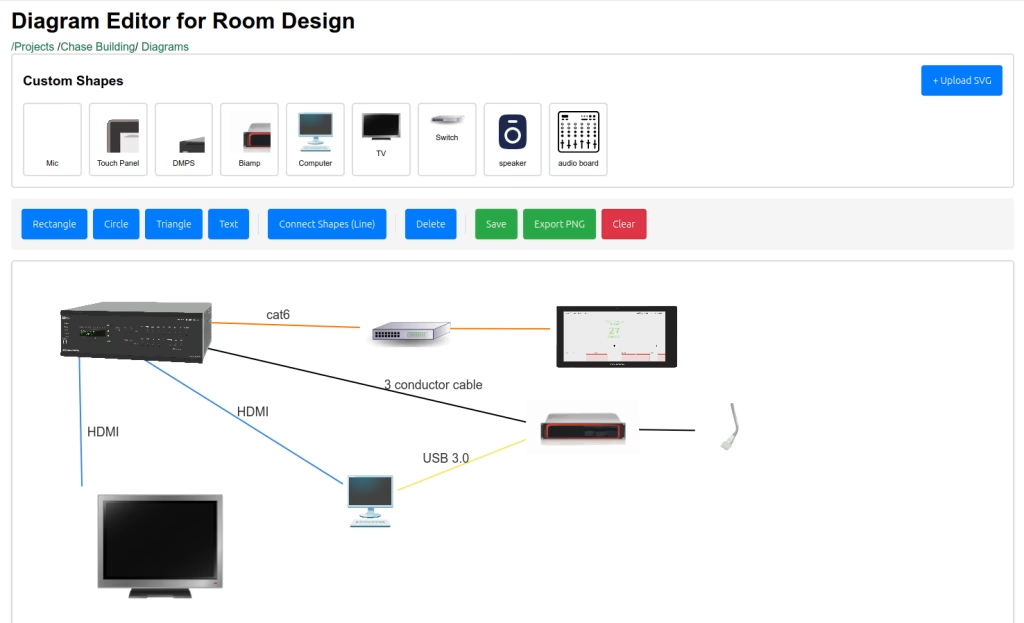
We’re thrilled to announce a powerful new feature for Find Boxes Projects: the Diagram Editor. This intuitive, browser-based tool lets you create professional diagrams to plan, document, and communicate your commercial AV installations—all within your existing Find Boxes workflow.
Why We Built This
As AV integrators, you know that a picture is worth a thousand words. Whether you’re planning a conference room installation, documenting device placement, or communicating your design to clients and colleagues, visual diagrams are essential. But switching between multiple tools disrupts your workflow and makes it harder to keep everything in one place.
That’s why we’ve built the Diagram Editor directly into Find Boxes Projects. Now you can create detailed installation diagrams right alongside your box selection and project planning—no additional software required.
What You Can Create
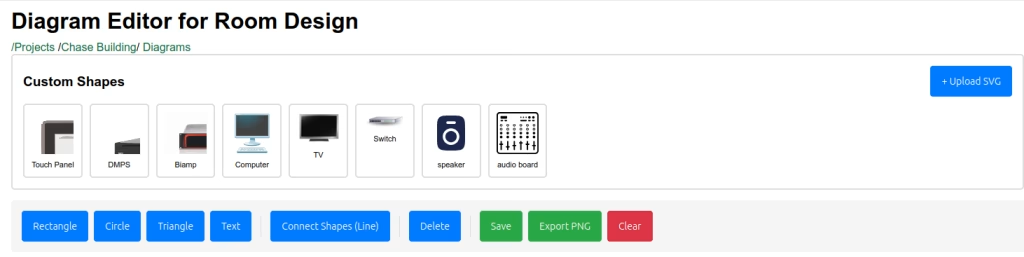
The Find Boxes Diagram Editor gives you everything you need to visualize your AV installations:
Built-In Shapes & Elements
- Rectangles – Perfect for representing displays, processors, or mounting locations
- Circles – Ideal for speakers, cameras, or microphones
- Triangles – Great for directional indicators or specialty equipment
- Text Labels – Add clear annotations, room labels, or equipment specifications
- Custom SVG Shapes – Upload your own equipment symbols and brand logos for truly professional diagrams
Smart Connection Lines
Create visual relationships between components with our intelligent line tool:
- Color-coded connections – Choose from any color to represent different signal types (video, audio, control, power)
- Smart attachment – Lines automatically connect to shape centers for built-in elements, or to borders for custom shapes
- Dynamic updates – Move shapes around and connections stay intact, automatically adjusting as you redesign
Custom Shape Library
Build your own library of equipment symbols:
- Upload SVG files of your most-used equipment
- Organize manufacturer logos, device icons, and custom symbols
- Reuse shapes across multiple diagrams in the same project
- Delete outdated shapes as your needs change
Professional Features
Mobile-Optimized Interface
The Diagram Editor works beautifully on any device:
- Pinch-to-zoom on tablets and phones for detailed work
- Touch-friendly controls with properly sized buttons and gestures
- Zoom controls – Dedicated +/- buttons and reset view for easy navigation
- Pan and explore – Navigate large diagrams with intuitive two-finger dragging
- Zoom indicator – Always know your current zoom level (50% to 300%)
Export & Share
Get your diagrams into the hands of stakeholders:
- PNG Export – Download high-quality images
- Auto-saved to projects – Every export is automatically saved to your Find Boxes project
- 2x pixel ratio – Crisp, professional-quality exports perfect for proposals and documentation
- Smart cropping – Exports automatically trim to your content with perfect padding
Seamless Workflow Integration
- Auto-save – Your work is automatically saved every 5 minutes
- Persistent state – Zoom levels and canvas position are remembered
- Project organization – Diagrams live inside your project along with your pull list, orders, notes and files
- Breadcrumb navigation – Easy access back to your projects and diagram lists
How It Works
Creating a diagram in Find Boxes is incredibly intuitive:
- Navigate to your project and create a new diagram
- Add shapes by clicking the toolbar buttons – they appear randomly positioned, ready to arrange
- Drag and resize shapes to match your installation layout (desktop users get full transform controls)
- Connect components by clicking the “Connect Shapes (Line)” button, choosing a color, and tapping two shapes
- Upload custom shapes for your specific equipment needs
- Export your diagram as a PNG with one click – it downloads and saves to your project automatically
Mobile Experience
On phones and tablets:
- Tap shapes to place them
- Drag with one finger to reposition
- Double-tap text to edit
- Use pinch gestures or zoom buttons to navigate
- Two-finger drag to pan around large diagrams
Desktop Experience
On computers, you get additional power:
- Click and drag to position precisely
- Transform handles for resizing and rotating
- Double-click text for inline editing
- Keyboard shortcuts and precise control
Why AV Integrators Need Diagram Software
Here’s how AV integrators are already using the Diagram Editor:
Conference Room Layouts – Map speaker positions, display locations, and control panel placement before you ever pull cable.
Equipment Rack Diagrams – Document your rack elevations with custom shapes for each piece of gear, color-coded connections for different signal paths.
Installation Plans – Show clients exactly where cameras, microphones, and displays will be positioned in their space.
As-Built Documentation – Create accurate records of completed installations for future service calls and system modifications.
Proposal Visuals – Include professional diagrams in your quotes to help clients visualize the solution you’re proposing.
Technical Excellence
We’ve built the Diagram Editor with the same attention to detail you expect from Find Boxes:
- Browser-based – No downloads, no installations, works anywhere
- Responsive design – Optimized for phones, tablets, and desktops
- Performance optimized – Smooth interactions even with complex diagrams
- Canvas technology – Built on Konva.js for professional-grade rendering
Getting Started
The Diagram Editor is available now in all Find Boxes Projects:
- Log into your Find Boxes account
- Navigate to any project
- Click “Diagrams” in the project menu
- Create your first diagram and start visualizing
We Want Your Feedback
As always, Find Boxes is built for AV integrators, by people who understand your workflow. We’d love to hear how you’re using the Diagram Editor and what features would make it even more valuable for your business.
Have questions or suggestions? Reach out to us through the help button in the app, or email us directly.
If you’re looking for an inventory and project management platform built specifically for AV and IT pros, there’s no better time to join.
Start your 30-day free trial today!
Happy diagramming!